Salesforce

About the highlighter test aid

« Go Back
Information
The highlighter is an on-screen digital tool for students to highlight desired text, questions, and answers. It is available in MAP Growth 2-5 and 6+ assessments, but not MAP Growth K-2 assessments. Highlighter is available on Windows, Mac, and Chromebooks. It is available on iPad for NSCAS testing, but it is not currently available for MAP Growth tests.

Highlighter is considered a test aid. Test aids are available for all NWEA test takers. Students can access the embedded technological aids as part of the MAP Growth testing platform at their own discretion.

How to highlight:

You can practice using the highlighter on the practice tests, and you can view a video about using the highlighter on our new Student Resources page. The practice tests and the Student Resources page are both linked from the test session log-in page. You can also access them directly here:  
To highlight text, select the icon in the toolbar then select the text to be highlighted or erased. On an iPad (NSCAS only), select the highlighter icon first, then touch and hold on the text you want to highlight. You can also select the text first, then select the highlighter icon.
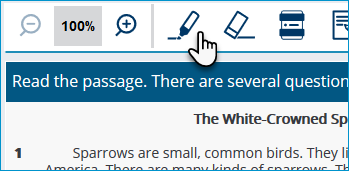
Screenshot of a portion of a sample test item showing the toolbar at the top and the highlighter icon.
Sample item

 
Unable to highlight some text

Some text may actually be an image. For example, many numbers, equations, and similar items are images and not text, therefore, are not selectable.
000005030
System Information
About the highlighter test aid
About-the-highlighter

Powered by