To enable the built-in text-to-speech functionality on a MAP Growth assessment for a student:
- Create or open a test session as normal and assign the test to a student. See Set Up Testing for Students in the MAP Help Center.
- Select the students you wish to assign text-to-speech to.
- Verify that the student already has a test assigned. If not, click the Assign Test(s) button to assign a test. Text-to-speech is available for both English and Spanish tests but is not available for K-2 tests.
- Select the Accommodations button. See Accommodations and Accessibility in the MAP Help Center.
- Scroll to either the Embedded Designated Features section or the Embedded Accommodations section.
- The text-to-speech options are located under both sections, and the functionality is the same under either section.
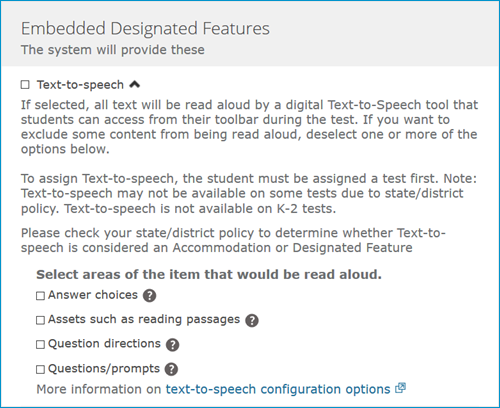
- Select Text-to-speech.
- If the text-to-speech options are greyed out, verify that the student has an eligible test assigned and the student is in Awaiting Student status. Please see Do all MAP Growth K-2 test questions have audio? for more information.
- Note: Text-to-speech is available for both English and Spanish tests but is not available for K-2 tests. The K-2 test has built-in audio for all students and is not compatible with text-to-speech.
- When you select Text-to-speech, by default all text will be read aloud. If you want to exclude some content from being read aloud, deselect one or more of the options shown. The available options are listed below:
- Answer choices
- Assets such as reading passages
- Question directions
- Questions/prompts
- Select Assign at the bottom of the screen.
- When the student starts their test, they will see the text-to-speech buttons in the toolbar.

For more information on how students can use text-to-speech, see: How do students use text-to-speech in a MAP Growth test?
If you are experiencing issues assigning text-to-speech, see: Unable to assign text-to-speech
Note:
- Accommodations assigned to students in testing can be found in the Combined Data Export. Column DU - AccommodationCategories
- You can only assign accommodations to a student who is not actively testing.
- The option to read aloud "Assets such as reading passages" applies to all subject areas, not just reading. For example, on math tests, tables and charts would be read aloud if this option is checked.
- Text-to-speech is provided by an artificial human voice.
- The text-to-speech accommodation will be removed if you change the student's test assignment. See Do I have to assign accommodations to a student every time they test? for more info.
See also: